Store Room
Overview
The Store Room feature allows to create and manage store rooms used to organize and control inventory stock within a property.
Store rooms represent the physical or logical locations where inventory items are stored. Each store room can have its own inventory requirements, including Minimum Stock Quantity, Maximum Stock Quantity, and assignment rules.
Store rooms are used during the inventory assignment process to determine where approved inventory should be placed and how much stock should be assigned to each location.
The Store Room feature is a single-screen feature — existing store rooms are displayed in a list, and new store rooms can be created from the same screen.
Store Room Screen
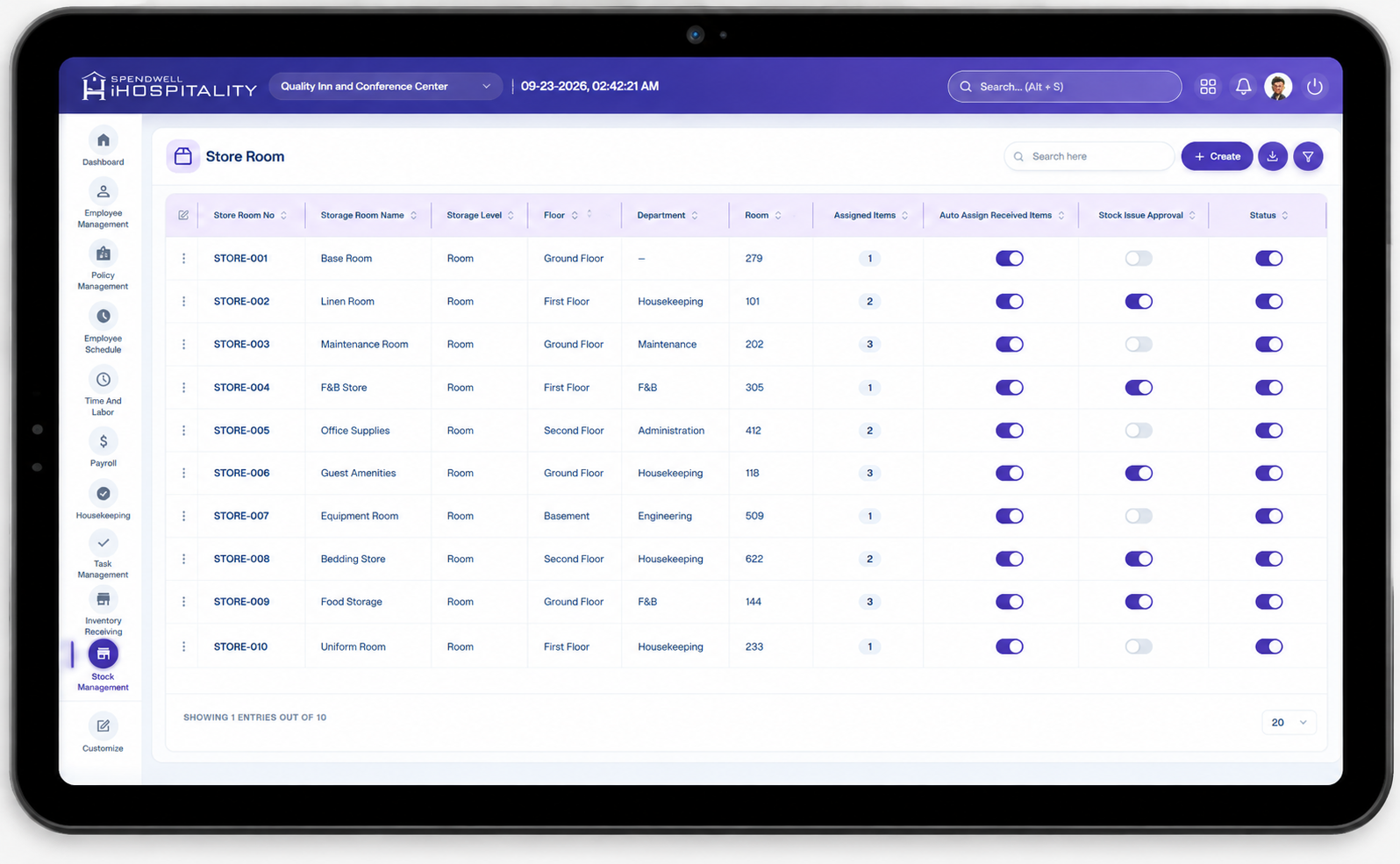
The screen provides the following controls:
- Store Room — Displays the name of the configured store room.
- Create — Opens the Add Store Room panel for creating a new store room.
Administrators can review the configured store rooms and create additional storage locations from the same screen.
Key Fields
-
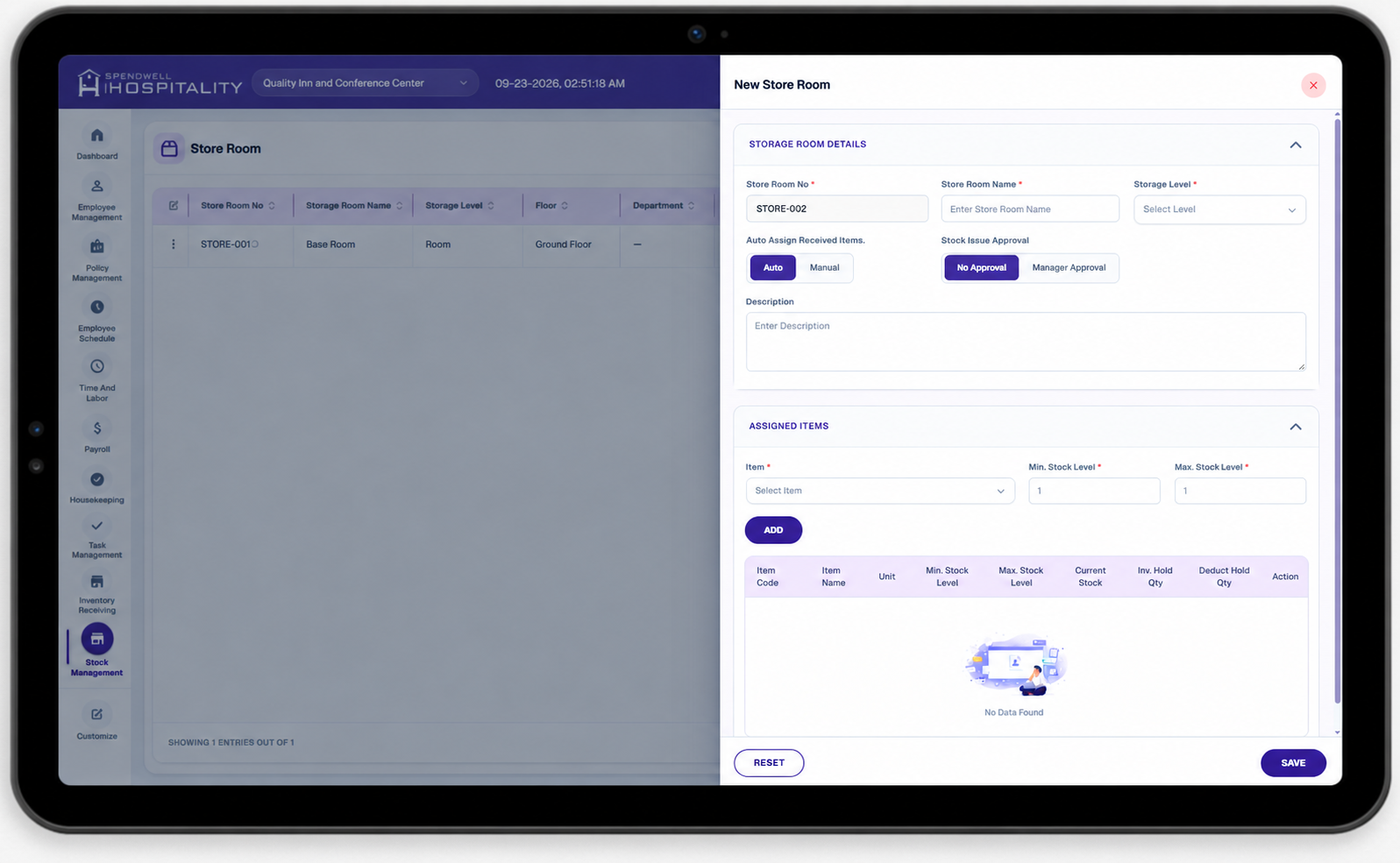
Store Room — Required field used to enter the name of the store room. The name should clearly identify the location where inventory will be stored, such as Main Store, Housekeeping Store, Kitchen Store, or Maintenance Store.
-
Property — Identifies the property to which the store room belongs. The store room is available for inventory management within the selected property.
-
Minimum Stock Quantity — Defines the minimum quantity of an item that should normally be maintained in the store room. This value is used as a reference when determining whether additional inventory needs to be assigned to the store room.
-
Maximum Stock Quantity — Defines the maximum quantity of an item that should normally be maintained in the store room. This value helps control the amount of inventory assigned to the store room and prevents unnecessary overstocking.
-
Approval Required — Determines whether inventory assignments to the store room require approval before the stock can be assigned.
- When enabled, the assignment must be reviewed and approved before it is finalized.
- When disabled, the inventory can be assigned without an additional approval step.
-
Auto Assign Received Items — Determines whether approved received inventory should be automatically assigned to store rooms according to the configured inventory requirements.
- When enabled, the system can calculate and prepare store room assignments based on the required stock levels.
- When disabled, inventory assignment is handled manually.
-
Save — Saves the store room configuration.
-
Save & Add New — Saves the current store room and keeps the create form open so the administrator can immediately create another store room.
-
Reset — Clears the information entered in the create form without saving the store room.
-
Close — Closes the create form without saving the current changes.
Steps
Create a New Store Room
Store Room Inventory Assignment
Store rooms are used when approved inventory is assigned to storage locations.
The assignment process can use the store room's configured stock requirements to determine the quantity that should be assigned.
For example:
Maximum Stock Quantity − Current Stock Quantity = Required Assignment Quantity
If a store room has:
- Maximum Stock Quantity: 100 Pieces
- Current Stock: 40 Pieces
The required assignment quantity is:
100 − 40 = 60 Pieces
When Auto Assign Received Items is enabled, the system can use these inventory requirements to prepare the appropriate store room assignment.
Important Notes
- A store room should be configured for the appropriate Property before it is used for inventory assignment.
- Minimum Stock Quantity represents the lower inventory level that should normally be maintained.
- Maximum Stock Quantity represents the upper inventory level that should normally be maintained.
- Store room stock requirements can be used during automatic inventory assignment.
- When Approval Required is enabled, the store room assignment must go through the configured approval process.
- When Auto Assign Received Items is enabled, the system can automatically prepare inventory assignments based on store room stock requirements.
- Store rooms should have clear and consistent names so employees can easily identify the correct inventory storage location.