Time & Attendance
Overview
The Time & Attendance feature allows employees to view and monitor their attendance and time-entry records from one centralized screen.
Employees can review their:
- Total worked hours
- Total wages
- Total shifts
- Scheduled hours
- Clock-in and clock-out times
- Daily worked hours
- Daily wages
- Attendance status
- Face Login attendance entries
- System-generated Auto Clock-Out entries
Time & Attendance provides employees with visibility into their actual working time and allows them to identify missing or incorrect attendance entries that may require Log Regularization.
Time & Attendance Screen
The Time & Attendance screen provides a consolidated view of the employee's attendance records for the selected date range.
Employees can review each daily time entry and compare their scheduled hours with their actual worked hours.
Key Information
- Total Hrs — Total worked hours for the selected date range.
- Wages — Total wages calculated for the selected date range.
- Shifts — Total number of recorded shifts.
- Sch. Hrs — Scheduled working hours for the employee.
- Clock-In — Recorded start time of the work period.
- Clock-Out — Recorded end time of the work period.
- Hrs — Actual worked hours calculated from the attendance entry.
- Wage — Wage calculated for the individual attendance entry.
- Status — Indicates the current state of the attendance record.
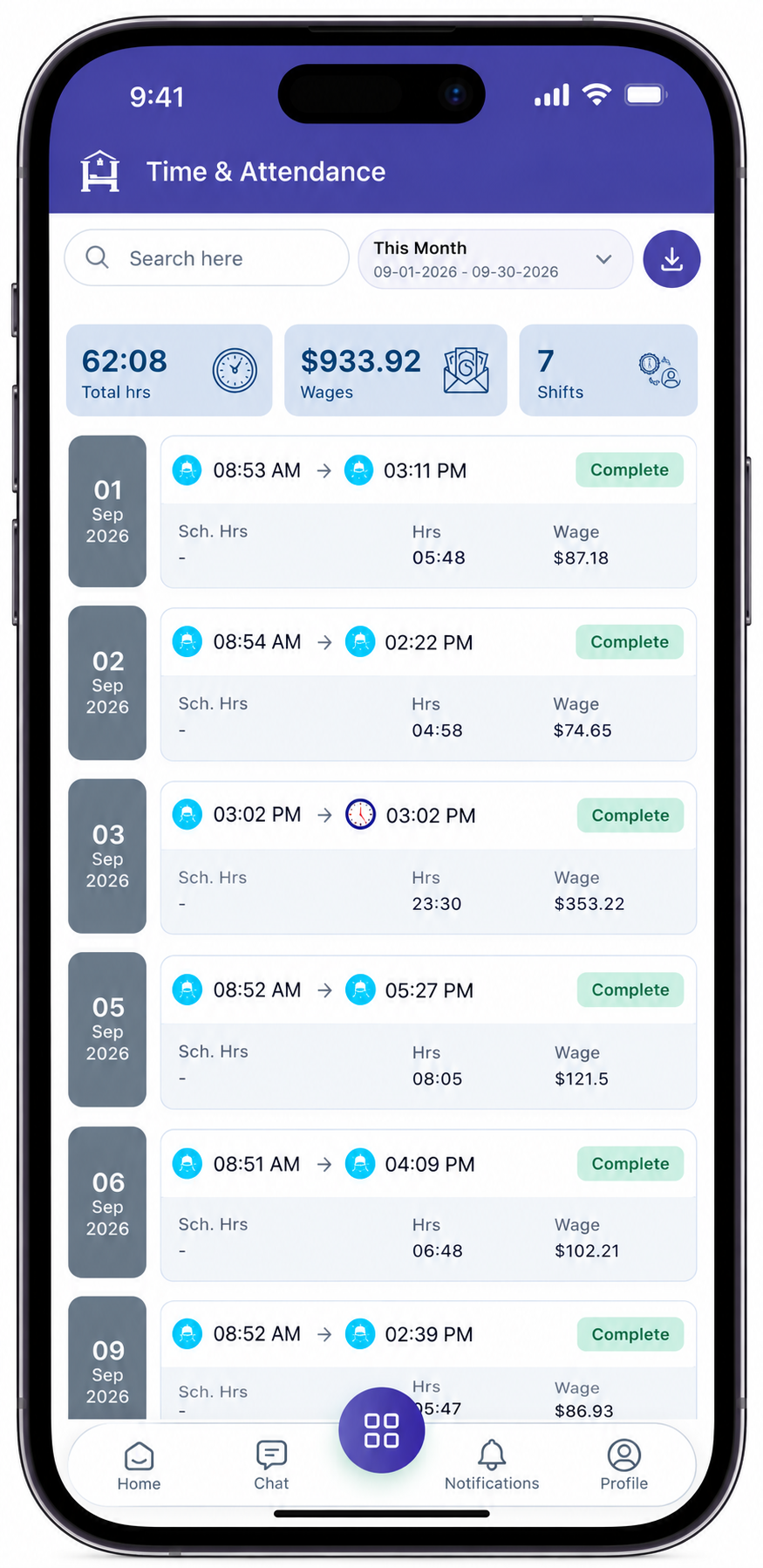
Date Filter
Employees can use the date filter to view their attendance records for a specific period.
The selected date range controls the attendance records displayed on the screen and the summary values shown at the top.
Example
This Month
09-01-2026 - 09-30-2026
Employees can select another date range to review attendance for a different period.
Date Filter Usage
- Open Time & Attendance.
- Select the date filter.
- Select the required date range.
- Apply the filter.
- Review the attendance records for the selected period.
Note: Total Hours, Wages, and Shifts are calculated according to the selected date range.
Attendance Summary
The summary section provides a quick overview of the employee's attendance for the selected period.
| Summary | Description |
|---|---|
| Total Hrs | Total worked hours recorded for the selected date range. |
| Wages | Total wages calculated for the selected date range. |
| Shifts | Total number of recorded shifts for the selected date range. |
Total Hours
Total Hrs represents the total recorded worked hours for the selected period.
Wages
Wages represents the total wages calculated from the employee's recorded attendance and applicable wage rules.
Shifts
Shifts represents the total number of recorded work shifts within the selected date range.